
How to Evaluate Competency Management Software for a Regulated Workforce

Whew, a polished dashboard can look convincing until someone asks what evidence supports a worker’s qualification.
For regulated, technical workforces, competency management software needs to do more than list skills or record training completion.
It should help you understand what a role requires, what a person has demonstrated, and what action should follow when a gap appears.
The right evaluation starts with the evidence behind the status, not the number of features on a product page.
Start with the decisions your system must support
Before comparing vendors, identify the decisions your teams need to make.
Can this employee perform this task, in this role or location, based on current evidence?
Can a supervisor quickly see who is ready, who needs development, and whose competency has not yet been verified?
Can your team trace an assessment result back to the requirement it was meant to satisfy?
These questions keep the selection focused on real work rather than broad feature claims.
A competency management system should centralize assessment results, proficiency levels, and competency histories so teams can track progress over time and access audit-ready records with secure, role-based access.
The evidence chain matters more than the dashboard
A color-coded matrix is useful only when you can understand what each status means and where it came from.
Look for a clear connection between the requirement, source content, training, assessment, result, and development action.

That chain helps teams answer the important follow-up questions: What competency was required? What content supported it? How was it assessed? What result was recorded? What happened next?
Ask vendors to demonstrate how a user moves from a dashboard status to the assessment and related evidence.
Also ask how the system distinguishes between “not yet verified” and “needs development,” and how it represents an expired qualification or one due for reassessment.
A system should make those differences clear rather than hide them inside a single generic status.
Evaluate capabilities by how they support decisions
Use your own roles, competencies, and work scenarios to test what matters.
| Evaluation area | What to look for | What to ask in a demo |
|---|---|---|
| Requirements | Competencies and required proficiency levels defined by role or regulation | Can you show the requirement behind a specific employee’s status? |
| Assessment evidence | Results and histories linked to competency records | Can I review how the result was established and what evidence supports it? |
| Gap analysis | Comparison of required levels with levels validated through assessment | Can the system identify gaps before they become urgent operational issues? |
| Workforce visibility | Real-time views across individuals, teams, and the organization | Can I identify patterns by role, location, or team? |
| Development actions | Plans that connect identified needs to next steps | Can you show how an assessment result leads to a development plan? |
| Benchmarking | Internal comparisons and relevant industry context | Can I compare results across teams and locations, and against industry benchmarks? |
| Readiness | Visibility into competency for specific equipment, such as make and model | Can I see who is qualified, needs development, or needs reassessment? |
This approach can also help you evaluate competency tracking software claims.
A vendor should be able to explain what is tracked, how the status is established, and what users can do with the information.
Test whether the system sees more than course completion
Training completion and demonstrated competency answer different questions.
A learning record can show that someone completed assigned material, while an assessment can show whether that person demonstrated a required level.
For technical work, ask how the system brings those views together without treating them as interchangeable.
For example, ask whether on-the-job supervisor check-offs can add practical verification alongside digital knowledge assessment.
That two-layered approach can help teams record both what a worker knows and how competency was verified in practice.
Look for useful gap analysis, not just a list of missing skills
A useful skills gap analysis compares what a role requires with competency levels supported by assessment.
It should help you identify gaps that need attention and make it easier to prioritize development based on need.
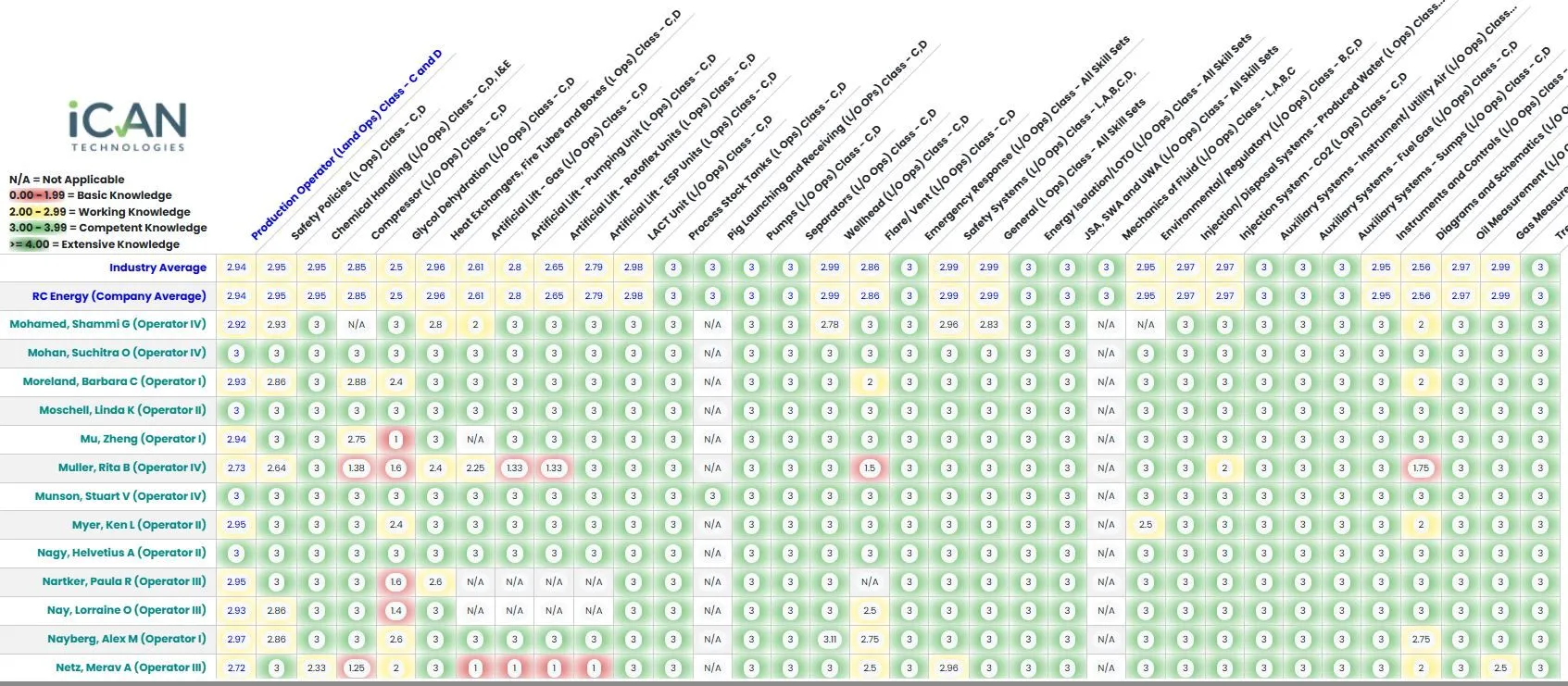
Ask whether the system can show patterns across individuals, teams, and the organization, and whether it can compare results across roles and locations.
Industry benchmarking can add context to internal results by comparing them with aggregated industry data.
It should inform your review, not replace the requirements your organization has defined.
Also ask how assessment results connect to development actions.
For example, iCAN’s Competency Management System connects individual competency, assessment results, workforce-level gaps, and development needs, with internal and industry benchmarking.
Make the demo prove the workflow
Do not rely on a standard product tour that shows only polished summary screens.
Give every vendor the same scenario and ask them to demonstrate each step using your use case.
- Define a role-based competency requirement.
- Show the training and assessment connected to it.
- Record an assessment result and review the competency history.
- Show how the system marks a gap or an unverified competency.
- Open a development plan based on assessment data.
- Review team-level results and available benchmarks.
- Show readiness for a specific equipment make and model, including who needs development or reassessment.
- Trace a dashboard status back through its supporting records.
As you watch, notice how many steps require manual work or separate files.
The goal is not to see the most screens.
The goal is to see whether the system helps your team follow the evidence and make a clear decision.
Check governance and everyday usability
A system only helps if the right people can use it and the right people can access the records.
Ask how secure, role-based access works for employees, supervisors, assessors, and administrators.
Then consider whether workers and supervisors can understand the statuses and take the next step without relying on a specialist to interpret every report.
Real-time heat maps and dashboards should make it easier to review competency across individuals, teams, and the organization.
Historical records should also help teams understand how competency has changed and what development actions followed.
Separate marketing checkboxes from working capability
“AI-powered,” “audit-ready,” and “real-time” sound useful, but the labels do not tell you how a system works in your setting.
Ask vendors to show the workflow behind each claim.
If a product uses AI and automation, ask how it supports evidence capture, recognizes patterns across larger data sets, prioritizes high-impact gaps, or supports insights into future skill needs.
If a vendor offers benchmarking, ask what comparisons are available and how leaders can use them alongside internal requirements.
If a system shows a competency status, ask what assessment and history support it.
The answers will tell you more than a feature list.
Choose a system that keeps the evidence connected
Competency management software should help your organization move from requirements to verified capability and targeted action.
The essentials are clear requirements, assessment-backed results, accessible competency histories, useful gap analysis, and visibility into development needs.
Then test how well the evidence traceability chain works in the situations your teams actually face.
That is how you tell the difference between a system that displays workforce data and one that helps your organization understand what the data means.
Book a demo to see how iCAN connects competency evidence, workforce insights, and development actions.
Frequently Asked Questions
What is competency management software?
Competency management software organizes role requirements, assessment results, proficiency levels, and competency histories so an organization can understand and develop workforce capability.
What features should you look for in competency management software?
Look for role-based requirements, assessment-backed results, historical records, real-time workforce visibility, gap analysis, development planning, and evidence that connects each requirement to its outcome.
How does competency management software differ from an LMS?
An LMS manages learning delivery and completion, while competency management software helps track what workers have demonstrated through assessment and where development is needed.
Can competency management software support audit readiness?
Yes, it can support audit readiness by centralizing competency histories and connecting requirements, training, assessments, results, and development actions in a traceable record.
What is the difference between competency tracking software and a spreadsheet?
Competency tracking software can centralize results and histories, provide real-time views across a workforce, and connect competency gaps to development actions, rather than relying on separate spreadsheet updates.