
Skills Matrix Software: The Complete Guide to Real-Time Competency Tracking for Frontline Teams

Let us be honest: a spreadsheet skills matrix is out of date the moment it is saved.
Someone changes roles, completes training, lets a certification expire, or transfers to another site, and the spreadsheet no longer reflects operational reality.
That creates a difficult question for HSE managers, training leaders, and operations teams: who is actually ready to perform a specific task, on a specific asset, at a specific location, today?
Skills matrix software helps answer that question with current workforce data, competency evidence, qualification records, and development actions in one connected system.
This guide explains what modern skills matrix software does, how it differs from competency management software, and what technical and regulated organizations should evaluate before buying.
What Is Skills Matrix Software?
Skills matrix software is a digital system that maps employees against required skills, qualifications, tasks, roles, locations, assets, and proficiency levels.
Instead of showing only whether someone completed training, a modern matrix can show whether that person is:
- Not assessed
- In training
- Working under supervision
- Competent
- Qualified
- Expiring
- Expired
- Not authorized
The matrix becomes more useful when it connects each status to evidence, such as an assessment result, practical observation, certificate, supervisor approval, or reassessment record.
This matters because training completion does not always prove that an employee can apply knowledge correctly in the field.
The ISO 9001 Auditing Practices Group guidance on competence describes competence as the ability to apply knowledge and skills to achieve intended results.
That distinction is especially important in energy, utilities, chemical manufacturing, general manufacturing, healthcare, and other environments where work depends on current qualifications and demonstrated capability.
Why Spreadsheet Skills Matrices Fail
Spreadsheets can work for a small team with stable requirements.
They become difficult to trust when an organization manages multiple sites, shifts, contractors, job roles, assets, or regulatory requirements.
Common problems include:
- Manual updates that depend on one person
- Duplicate or inconsistent employee records
- No reliable connection between training and demonstrated competency
- Expired certifications that remain marked as current
- No evidence behind a green or red cell
- Limited visibility across sites and departments
- No automatic response when a role or procedure changes
- Difficult audit preparation
- Poor support for frontline and deskless workers
A spreadsheet also tends to answer a narrow question: whether a record was entered.
Operations leaders need a broader answer: whether the right person is prepared and authorized to perform the right work under current conditions.
What to Look for in Skills Matrix Software
The best skills matrix tools do more than replace a spreadsheet with a colorful grid.
They connect requirements, evidence, assessments, learning, qualifications, and workforce decisions.
Real-Time Updates
Look for a system that updates competency status when an assessment is completed, a qualification expires, a role changes, or a new requirement is assigned.
Real-time visibility helps managers identify current gaps without waiting for a monthly report or manual reconciliation.
Role, Site, and Asset Mapping
Competency requirements often change by role, location, customer, equipment, or asset.
A technician may be qualified for one pump model but not another, or authorized at one facility but not at a different site.
Skills matrix software should let you filter and report by:
- Employee
- Role
- Team
- Shift
- Department
- Location
- Contractor
- Customer
- Equipment
- Asset
- Required skill
This structure gives leaders a more accurate view of operational readiness.
Certification and Expiration Tracking
Certification tracking should include the credential, issuing organization, issue date, expiration date, supporting document, verification status, and renewal history.
The system should identify credentials that are current, approaching expiration, overdue, suspended, or pending verification.
It should also notify the right people before a qualification expires.
The OSHA confined-space training standard illustrates why training records need more than a completion mark, including employee identity, trainer information, training dates, and evidence of proficiency where applicable.
Assessment Evidence
A strong system stores the evidence behind a competency decision.
That may include:
- Written exam results
- Practical evaluations
- Field observations
- Assessor approvals
- Supervisor sign-offs
- Work samples
- Certificates
- Reassessment dates
- Development plans
- Supporting documents
This evidence helps teams explain how a qualification decision was reached.
Audit Trails
An audit-ready system should preserve the history of requirements, assignments, assessments, approvals, changes, and qualification status.
That makes it easier to answer questions such as:
- What was this employee required to know?
- Which procedure supported the requirement?
- What training was assigned?
- How was competency assessed?
- Who approved the result?
- What happened after a gap was identified?
Reporting and Heat Maps
Reporting should show more than individual records.
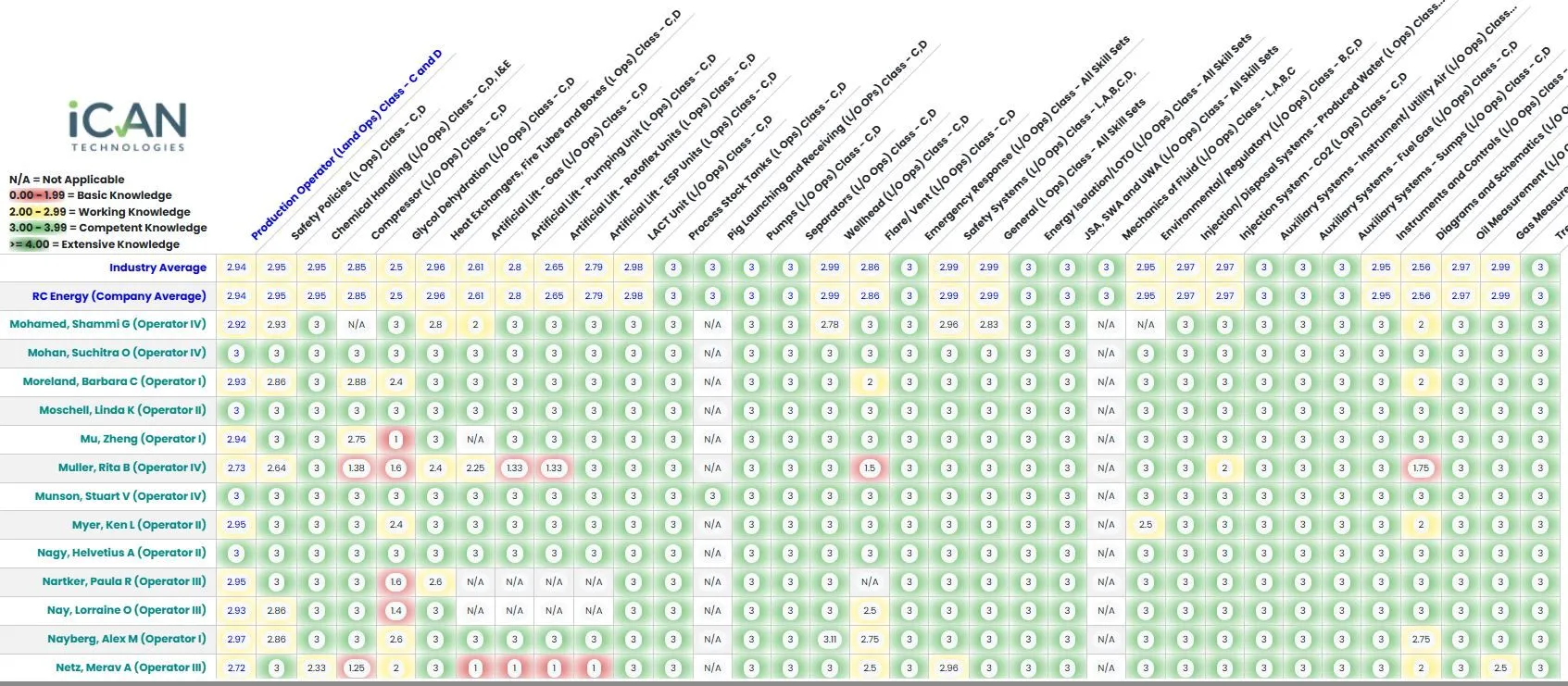
Managers should be able to see competency gaps across teams, roles, departments, shifts, and locations.
A heat map can highlight areas of strength, developing capability, and concentrated risk.
Skills Matrix vs. Competency Management System
A skills matrix is a view of workforce capability.
A competency management system is the broader process and technology used to define, assess, improve, and maintain that capability.
The difference is important.
| Capability | Skills Matrix | Competency Management System |
|---|---|---|
| Shows employee-to-skill relationships | Yes | Yes |
| Tracks training completion | Sometimes | Yes |
| Stores assessment evidence | Limited or variable | Yes |
| Manages qualifications and expirations | Sometimes | Yes |
| Connects gaps to development plans | Limited | Yes |
| Supports industry benchmarking | Rarely | Yes |
| Maintains traceability from requirement to result | Limited | Yes |
| Supports workforce-wide competency decisions | Limited | Yes |
A learning management system primarily manages courses, assignments, attendance, and completion.
Skills matrix software visualizes current coverage and gaps.
Competency management software connects requirements to evidence, development, reassessment, and workforce improvement.
iCAN’s Competency Management System connects individual competency profiles, assessment results, qualifications, development plans, heat maps, and industry comparisons.
That helps organizations move from “Who completed training?” to “Who has demonstrated the required capability?”
How AI Changes the Equation
AI can accelerate the work of building and maintaining a competency system, especially when an organization already has a large library of procedures, manuals, policies, and technical documents.
Instead of starting with a blank course editor, teams can use their existing source content to create training, exams, and competency assessments.
iCAN’s AI Authoring Tools support this workflow while allowing customers to retain ownership of the content created from their materials.
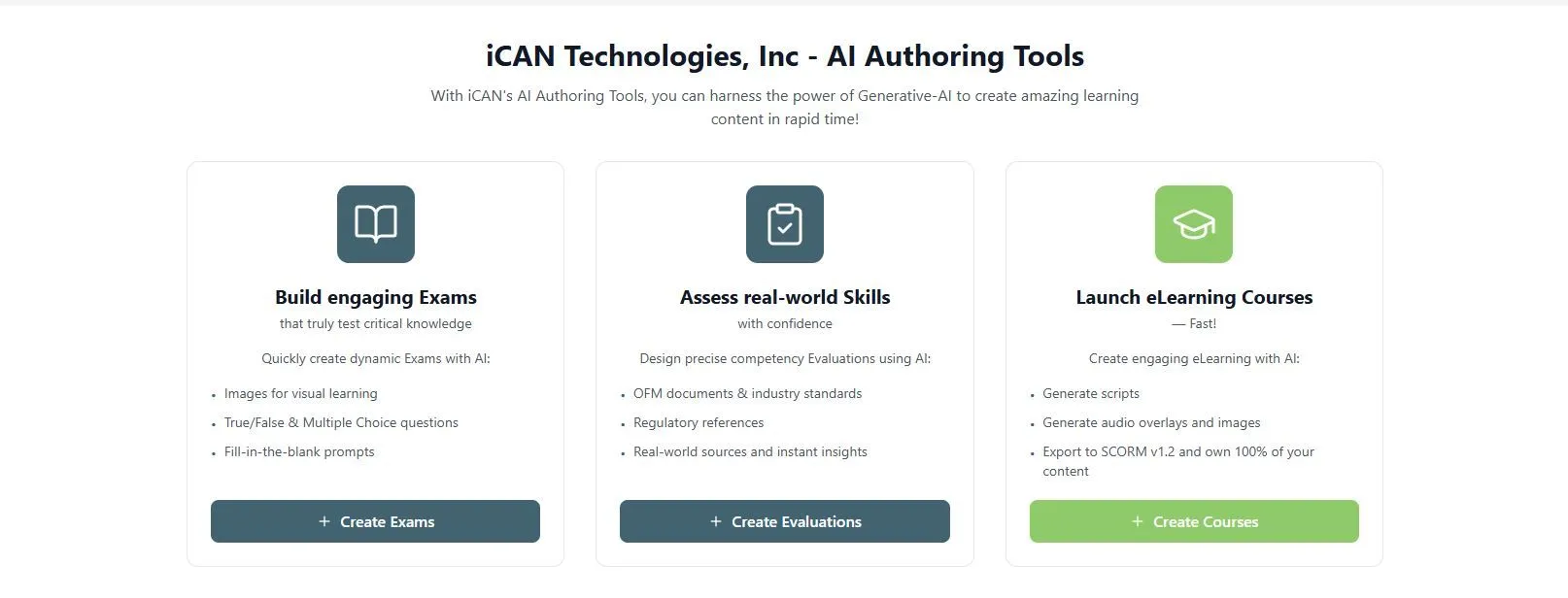
The practical AI workflow looks like this:
- Start with an approved procedure, manual, or policy.
- Generate role-specific learning content.
- Create exams and applied assessments.
- Connect the assessment to required skills.
- Review results and identify competency gaps.
- Assign targeted development.
- Reassess and track improvement.
AI does not replace subject-matter experts or qualified assessors.
It helps them move faster while keeping the organization’s own procedures and knowledge at the center of the process.
Real-time heat maps then turn assessment results into a workforce view that leaders can use to prioritize development and readiness actions.

Why Industry Benchmarking Matters
Internal comparisons are useful, but they do not always show whether a workforce is performing at a competitive or expected level.
Industry benchmarking provides additional context.
For safety-critical roles, benchmarking can help leaders identify whether a recurring gap reflects:
- A local training issue
- A role definition problem
- An assessment inconsistency
- A broader industry challenge
- A need for additional development investment
iCAN includes industry benchmarking against the largest Gulf of Mexico competency dataset, giving organizations a broader reference point for relevant competency areas.
Benchmarking should support better decisions, not create a race for a single score.
The most useful question is not simply whether a team is above or below an average.
It is whether the organization understands the reason for the gap and has a practical plan to address it.
Skills Matrix Software Buying Guide
Use this checklist when evaluating vendors:
- Can the platform map requirements to roles, sites, assets, shifts, and contractors?
- Does it distinguish training completion from demonstrated competency?
- Can it store certificates, assessment results, observations, and approvals?
- Does it automatically track certification expirations?
- Can managers filter results in real time?
- Does it provide heat maps and gap analysis?
- Can competency gaps create targeted development plans?
- Does it support reassessment and recurring qualification requirements?
- Does it maintain a complete audit trail?
- Can frontline users and assessors access the system easily?
- Does it connect with your LMS, HR system, scheduling tools, or access controls?
- Can your organization retain ownership of its training content and records?
- Can the vendor demonstrate an expired credential, failed assessment, role change, and reassessment workflow?
Ask vendors to demonstrate real operational scenarios instead of showing only a static dashboard.
The strongest platforms prove how a change flows through the system.
Frequently Asked Questions
What is skills matrix software?
Skills matrix software digitally maps employees against required skills, qualifications, roles, tasks, and proficiency levels while showing current gaps and workforce coverage.
How is a skills matrix different from a competency matrix?
A skills matrix usually shows whether employees have specific skills, while a competency matrix can include proficiency levels, assessment evidence, qualifications, and demonstrated ability to perform work.
Can a skills matrix track certifications and expirations?
Yes, modern skills matrix software can track certification details, supporting documents, expiration dates, renewal status, reminders, and overdue qualifications.
Do modern skills matrix tools work for frontline and deskless workers?
Yes, many modern tools support frontline teams through mobile access, simple workflows, delegated assessments, and visibility by site, shift, role, task, or asset.
How often should a skills matrix be updated?
A skills matrix should update whenever a requirement, role, assessment result, qualification, work location, procedure, or expiration status changes.
Move Beyond Training Completion
A skills matrix is only valuable when people can trust what it shows.
For technical and regulated workforces, that means connecting requirements to learning, assessments, evidence, qualifications, development actions, and current readiness.
iCAN brings those capabilities together through its Competency Management System, Data-Driven LMS, and AI authoring tools.
Book a demo to see how real-time heat maps, industry benchmarking, and tailored development plans can support your workforce.
You can also start with a free 14-day trial.
Regulatory and qualification requirements vary by industry and jurisdiction, so software configuration should always be reviewed against the procedures, standards, and requirements that apply to your organization.